
A well-designed boq sheet format is the backbone of every successful interior, civil, and fit-out project in India. It provides a clear, structured, and professional list of all items with quantities, specifications, rates, and GST details that clients, architects, and tender committees expect.
👉Download the Interior Work Estimate Template Excel for just ₹149 and save ₹1,499 – grab it now!
Without the right boq format in excel, many interior designers and contractors face endless problems — calculation errors, missing GST breakup, inconsistent item descriptions, unprofessional presentation, and delayed submissions. These issues often lead to lost tenders, client disputes, and budget overruns.
In 2026, whether you are working on a 2BHK apartment renovation in Pune, a luxury villa in Bengaluru, or a 14,000 sq.ft. corporate office in Delhi-NCR, using a professional boq sheet format can save you 10+ hours per project while making your quotes look highly credible. This article explains the standard boq sheet format, shows real examples for interior works, and guides you on how to use an automated version that follows IS 1200, CPWD guidelines, and current GST rules.
What is a BOQ Sheet Format and Why It Matters in Indian Construction?
A BOQ (Bill of Quantities) sheet format is a standardized document that lists every item of work, material, and labour required for a project along with quantities, unit rates, and total costs. In India, a good bill of quantities format india serves multiple purposes — accurate estimation, tender submission, vendor ordering, cost control, and final billing.
The right boq sheet format matters because Indian construction and interior projects involve hundreds of items across multiple trades. Manual formats often lead to errors in quantity calculation, wrong GST application, and poor presentation. A professional format ensures compliance with IS 1200 (Method of Measurement), CPWD specifications, and GST laws while presenting your quote in a clean, logical manner that builds client trust.
Using a proper standard boq format for tender helps you avoid under-quoting or over-quoting, reduces disputes during execution, and increases your chances of winning projects in both residential and commercial segments.
Learn more about accurate quantity takeoff → Plumbing Quantity Take-off Worksheets
👉Download the Interior Work Estimate Template Excel for just ₹149 and save ₹1,499 – grab it now!
Standard BOQ Sheet Format Columns Used in India (2026)
A professional boq sheet format in India follows a consistent column structure that is widely accepted by architects, consultants, and government departments.
Here is the most recommended column setup:
| Sl. No. | Item Code | Description of Work | Specification / Brand | Unit | Quantity | Rate (₹) | Amount (₹) | GST % | GST Amount (₹) | Total Amount (₹) | Remarks |
| 1 | INT-101 | Vitrified Tile Flooring | 800×800 mm, Kajaria / Somany | Sq.ft | 1250 | 85 | 1,06,250 | 18% | 19,125 | 1,25,375 | Living + Dining |
| 2 | INT-205 | Gypsum False Ceiling | 12mm thick with cove | Sq.ft | 980 | 145 | 1,42,100 | 18% | 25,578 | 1,67,678 | All rooms |
👉Download the Interior Work Estimate Template Excel for just ₹149 and save ₹1,499 – grab it now!
Key Columns Explained:
- Description of Work — Clear, detailed item description as per IS 1200.
- Specification / Brand — Helps avoid ambiguity (very important for interior works).
- GST % & GST Amount — Separate columns for full transparency and compliance.
- Remarks — Useful for location (room-wise), phase, or special notes.
This structure forms the foundation of any good construction boq excel format.
Best BOQ Sheet Format for Interior Works in India
The boq sheet format for interior works differs slightly from pure civil works because it involves many finishing trades and brand-specific items.
👉Download the Interior Work Estimate Template Excel for just ₹149 and save ₹1,499 – grab it now!
Typical Sections in a Professional Interior BOQ:
- A. Demolition & Civil Works
- B. Flooring & Tiling Works
- C. Wall Finishes, Cladding & Painting
- D. False Ceiling & POP Works
- E. Partitions, Panelling & Woodwork
- F. Electrical & Lighting Works
- G. Plumbing & Sanitary Works
- H. Furniture & Fixtures
- I. Miscellaneous & Contingencies
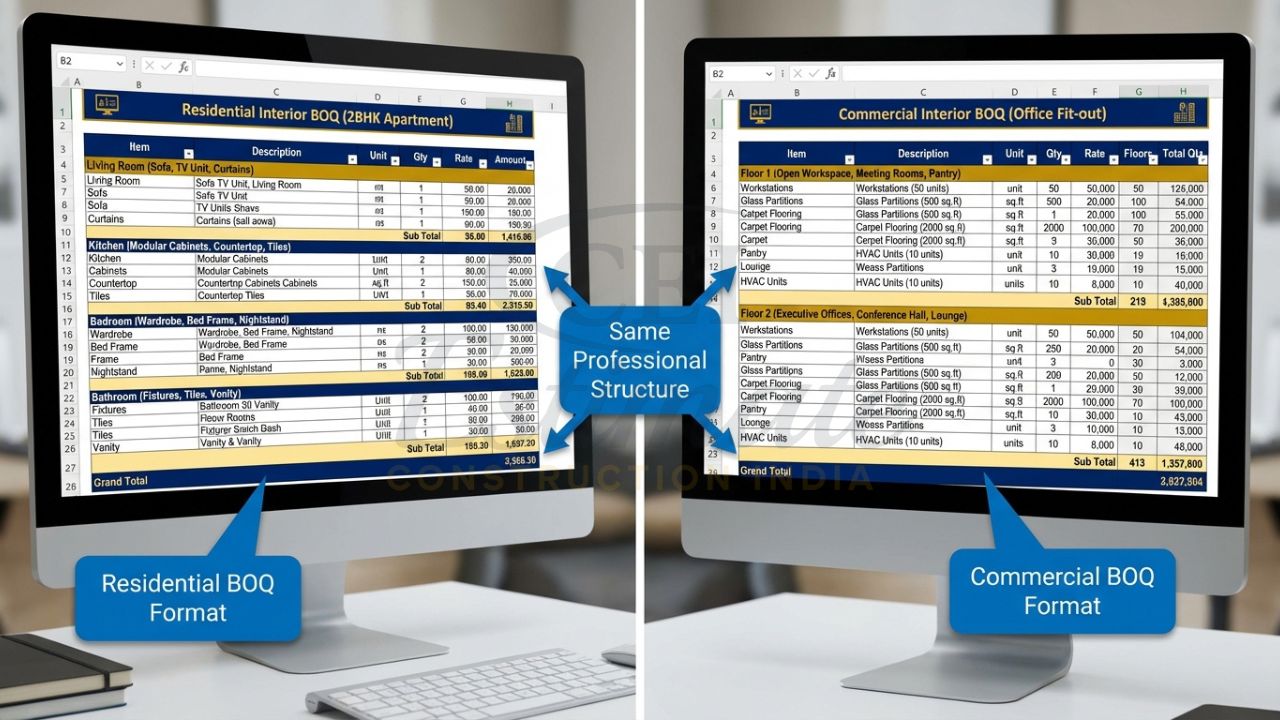
For residential projects, use a residential boq format with room-wise breakup (Master Bedroom, Kitchen, Living Room, etc.). For offices and retail, a commercial boq sheet format works better with area-wise or floor-wise grouping.
A good interior design boq sheet format includes smart dropdowns for brands and room-wise takeoff sheets so quantities are calculated systematically without missing items.
Automated BOQ Sheet Format in Excel – Features Every Estimator Needs
Modern estimators prefer an automated boq sheet that removes manual drudgery. Here are the essential features:
- Fully Automated Calculations — Change quantity or rate, and all totals update instantly.
- Residential vs Commercial Toggle — Switch project type with one click and relevant items appear.
- Auto GST Breakup — Automatic calculation of CGST + SGST + IGST with proper taxable value separation.
- Smart Brand Dropdowns — Pre-loaded options for Asian Paints, Hettich, Jaquar, Century Ply, Greenlam, etc.
- Room-wise / Floor-wise Takeoff — Dedicated sheet for measurements that feeds directly into the main BOQ.
- Professional Dashboard & Summary — Grand total, GST summary, cost breakup by trade, and PDF-ready layout.
- Instructions + Rate Analysis Sheet — Built-in guidance and editable rate database.

Such an automated boq sheet is GST ready and follows best practices for both gst ready boq format and tender submissions.
👉Download the Interior Work Estimate Template Excel for just ₹149 and save ₹1,499 – grab it now!
Step-by-Step Guide: How to Use a Professional BOQ Sheet Format
- Download the template and open in Excel or Google Sheets.
- Fill project details and add your company logo on the cover page.
- Choose Residential or Commercial mode.
- Go to the Takeoff sheet and enter measurements room-wise or area-wise.
- Select brands from dropdowns and update current rates.
- Review the main BOQ sheet — all calculations and GST breakup are done automatically.
- Check the summary dashboard and export to PDF for client submission.
This process typically takes 30–60 minutes for a complete project.
Real Example – 14,000 Sq.ft. Office Interior BOQ Sheet Format
Consider a 14,000 sq.ft. corporate office fit-out project. A professional boq sheet format for this project is divided into clear sections:
- Section A – Demolition & Civil: Hacking of walls, removal of existing flooring, etc.
- Section B – Flooring & Tiling: Vitrified tiles in cabins, wooden flooring in MD room, carpet in workstations.
- Section C – Wall Finishes: Premium emulsion paint, wooden panelling, glass cladding.
- Section D – False Ceiling & POP: Gypsum board ceiling with cove lighting, grid ceiling in open areas.

Every item has detailed specification, brand mention, unit, quantity, rate, amount, and GST. The sheet looks clean, consistent, and completely tender-ready. Architects and clients appreciate this level of clarity.
Benefits of Using a Ready-Made BOQ Sheet Format Excel
Using a professional boq sheet format delivers measurable benefits:
- Saves 10+ hours per project on calculations and formatting
- Eliminates costly arithmetic errors
- Ensures full GST compliance and transparency
- Creates highly professional, tender-ready documents
- Improves client confidence and increases win rate
- Makes vendor coordination and site execution smoother
Experienced quantity surveyors know that a polished boq format in excel often becomes the deciding factor in competitive bidding.
👉Download the Interior Work Estimate Template Excel for just ₹149 and save ₹1,499 – grab it now!
Free vs Professional BOQ Sheet Format – Which One Should You Choose?
| Aspect | Free BOQ Formats | Professional Automated Format |
| Calculations | Manual | Fully automated |
| GST Breakup | Manual entry | Automatic CGST+SGST+IGST |
| Brand Support | None | Smart dropdowns (50+ brands) |
| Room-wise Takeoff | Not available | Built-in |
| Presentation | Basic | Tender-ready with dashboard |
| Time Saved | Minimal | 10+ hours per project |
| Updates & Support | None | Lifetime free updates |
For serious professionals, the choice is clear — a ready-made professional boq sheet format is a smart investment.
Where to Get the Best BOQ Sheet Format for Interior & Construction Works in India?
The boq sheet format shown and explained in this article is taken from the highly regarded automated Interior Design BOQ Template by Construction Estimator India.
For a limited period, you can get the complete professional package — including residential and commercial formats, automated calculations, auto GST, room-wise takeoff, and tender-ready layout — at just ₹149 (regular price higher).
The template works perfectly in both Microsoft Excel and Google Sheets, comes with lifetime updates, and includes step-by-step instructions.
Get Your Professional BOQ Sheet Format Now
Conclusion
A professional boq sheet format is no longer optional — it is essential for interior designers, contractors, and estimators who want to work faster, quote accurately, and win more projects in 2026. Stop struggling with manual errors and unprofessional documents.
Get the best automated boq sheet format today at the special launch price of only ₹149 and start creating tender-ready BOQs with confidence.
FAQ Section
Q1. What is the standard boq sheet format used in India?
It is a structured Excel format with columns for item description, specification, unit, quantity, rate, amount, GST, and remarks, prepared as per IS 1200 and CPWD guidelines.
Q2. Is the automated boq sheet format GST ready?
Yes. It automatically calculates and separates CGST, SGST, and IGST for full compliance.
Q3. Can I use the same boq sheet format for residential and commercial projects?
Yes. Professional templates include a toggle to switch between residential and commercial modes.
Q4. Does the boq format in excel support room-wise calculation?
Yes. Good templates have dedicated room-wise or floor-wise takeoff sheets.
Q5. How much time does a professional boq sheet format save?
Most users save 10+ hours per project compared to manual preparation.
Q6. Is prior Excel expertise required to use an automated boq sheet?
No. The templates are user-friendly with protected formulas and clear instructions.
Q7. Can I add my company logo and branding?
Yes. Easy placeholders are provided for logo, company name, and colours.
Q8. Are future rate updates included?
Yes. Lifetime free updates are provided with the purchase.
Q9. Is this boq sheet format suitable for tender submission?
Absolutely. It produces clean, professional, and tender-ready documents.