
Imagine you are a contractor in the bustling corridors of Delhi-NCR or a builder overseeing a luxury villa in the hills of Uttarakhand. You’ve just spent three sleepless nights manually calculating the Bill of Quantities (BOQ) for a high-stakes tender. You hit “submit,” only to realize a single formula error in the reinforcement steel section has undervalued your bid by ₹10 lakhs. In 2026, the Indian construction market is too competitive for such “human errors.” Precision isn’t just a goal; it’s a survival requirement.
At Construction Estimator India, we’ve seen how manual drudgery kills profit margins. That is why our team of experts has developed the most robust, automated Excel BOQ Template specifically designed for the Indian landscape. This tool isn’t just a spreadsheet; it’s a digital quantity surveyor that ensures your bids are professional, GST-compliant, and 100% accurate.
📊 Get a professional Excel BOQ Template and prepare accurate Bills of Quantities in minutes.
What is an Excel BOQ Template?
An Excel BOQ Template is a pre-formatted, automated spreadsheet used by construction professionals to calculate the total cost of a project by multiplying quantities of materials and labor by their respective rates. In 2026, a professional template must include automated GST calculations (12–18%), multi-trade support (civil, electrical, plumbing), and adhere to standard BOQ format and quantity takeoff practices in India 2026.
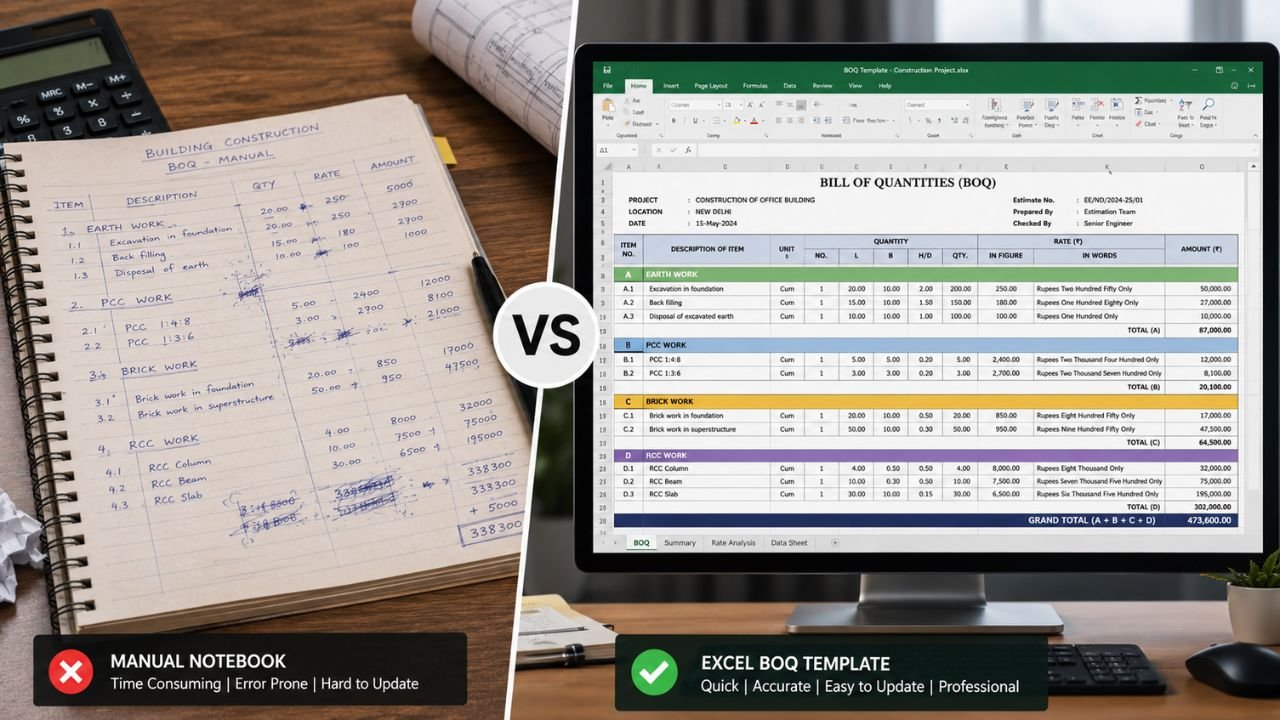
Why Choose Our Excel BOQ Template?
- Time Savings: Reduces estimation time from 6 hours to 30 minutes.
- Accuracy: Eliminates formula breaks and manual calculation errors.
- Compliance: Built-in 2026 GST slabs and tender-ready formats (CPWD/PWD style).
- Expertise: Built by Construction Estimator India with 10+ years of industry experience.
Download our ready-to-use Excel BOQ Template today. For custom BOQ, professional estimation or 3D plans across India, WhatsApp or call us today at +91 8630676890.
What is an Excel BOQ Template and Why Every Contractor Needs It
A Bill of Quantities (BOQ) is the structural backbone of any construction project. It provides a granular list of materials, labor, and equipment needed, complete with standardized units, quantities, and rates. In the 2026 Indian market, digital tender platforms like eProcure have made standardized formats mandatory for both government and private projects.
Without a professional Excel BOQ Template, contractors often struggle with disjointed data. A simple typo in a “Quantity × Rate” cell can lead to massive financial losses or disqualification from a tender. Our template ensures that every decimal point is in the right place, reflecting the latest 2026 GST and construction cost trends affecting BOQ preparation such as the rising cost of TMT bars and cement.
Key Features of Our Excel BOQ Template
Our template is engineered to handle the complexities of Indian site conditions. We have integrated features that typically require expensive specialized software into a portable, easy-to-use Excel file.
- Fully Automated Calculations: Input your quantity and rate, and the sheet live-updates totals, subtotals, and the grand total. No more manual calculators.
- 2026 GST Compliance: Built-in formulas automatically apply the latest GST slabs (typically 12% for civil works and 18% for services) to ensure your quotes are audit-proof.
- Tender-Ready Structure: The layout matches the Sl. No., Description, Unit, Qty, Rate, and Amount format required by PWD/CPWD evaluators and top-tier developers.
- 500+ Pre-Loaded Items: From M20 concrete and brickwork to premium internal plastering, the template includes items based on current 2026 market rates.
- Wastage & Profit Analysis: Protect your bottom line by automatically factoring in material wastage (5–10%) and setting custom profit margins (10–25%).
Who Should Use This Excel BOQ Template?
We designed this tool for versatility across the entire Indian building sector:
- Civil Contractors: Whether you are executing earthwork in Agra or RCC structures in Ahmedabad, this template ensures your bids are professional and competitive.
- Interior Designers: Managing a premium fit-out in Mumbai or Noida? Use our specialized interior sheets for woodwork, false ceilings, and lighting.
- Site Engineers & Quantity Surveyors: Save up to 30 hours per project by using a tool that adheres to the best practices for accurate BOQ preparation in Indian construction projects.
- Home Owners: Planning your dream home? Use this for house construction cost estimation services to verify contractor quotes and avoid hidden costs.
How This Excel BOQ Template Saves Time and Money
In construction, time is money. Preparing a BOQ manually for a 2,000 sq. ft. home can take a skilled engineer 4 to 6 hours. With our Excel BOQ Template, that time is slashed to 30 minutes.
Furthermore, the “cost of error” in India is high. A minor mistake of ₹100 in a rate for 5,000 units results in a ₹5 lakh discrepancy. Our automated system acts as a digital safety net. By providing accurate professional house construction estimation services, we help you maintain healthy margins even as material prices fluctuate in markets like Gujarat and UP.
🚀 Create tender-ready BOQs, improve cost planning, and speed up project estimation.
What’s Included in the Excel BOQ Template?
When you choose our system, you receive a comprehensive toolkit for project management:
| Component | Description | Benefit |
|---|---|---|
| Main BOQ Sheet | Standard columns (Sl. No, Desc, Unit, Qty, Rate, Amount) | Tender-ready output in minutes |
| GST Dashboard | Automatic tax calculation (CGST/SGST/IGST) | 100% tax compliance for 2026 |
| Summary Abstract | One-page project total view | Quick review for clients & architects |
| Trade Sections | Separate tabs for Civil, Electrical, and Plumbing | Full-site management in one file |
| Material Takeoff | Link site measurements directly to quantities | Eliminates measurement errors |
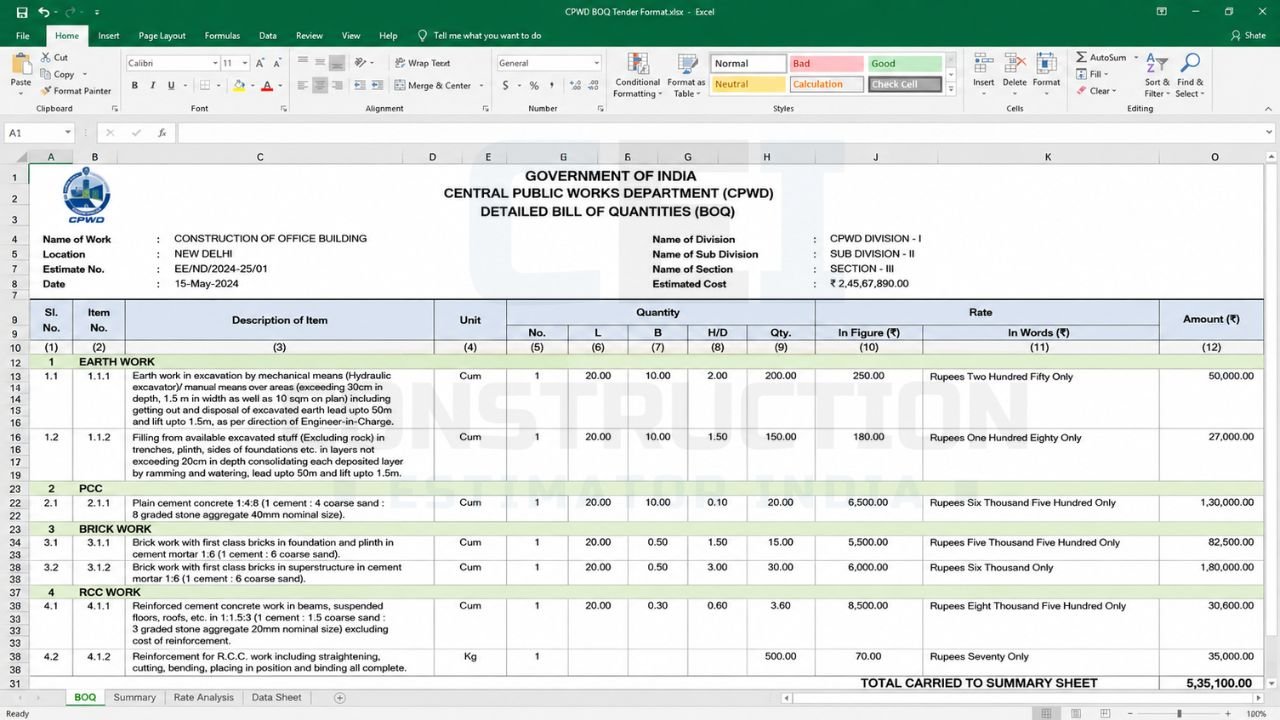
How to Use the Excel BOQ Template: A Step-by-Step Guide
Using the template is straightforward, even if you aren’t an Excel expert:
- Download & Open: Access the file instantly. It is compatible with Microsoft Excel and Google Sheets.
- Input Project Details: Enter the client name, site location (e.g., “Rana Villa, Gurgaon”), and project date in the header.
- Fill Quantities: Enter your site measurements (Qty) into the designated columns based on your site takeoff.
- Set Your Rates: Use our suggested 2026 rates or input local supplier quotes from markets like Delhi, Pune, or Mumbai.
- Review Auto-Calcs: Watch as the sheet computes amounts, applies GST, and adds your profit margin automatically.
- Export to PDF: Save a professional, branded copy to share with clients or upload to government tender portals.
Comparison: Manual BOQ vs. Ready Excel BOQ Template
| Feature | Manual Excel Sheet | Construction Estimator India Template |
|---|---|---|
| Setup Time | 4–8 Hours | 0 Minutes (Ready-to-use) |
| Calculation Accuracy | High risk of formula breaks | 100% Error-free automation |
| GST Compliance | Manual entry (prone to errors) | Fully automated 2026 slabs |
| Professionalism | Basic, often inconsistent | Designer-quality, tender-ready |
| Rate Analysis | Difficult to calculate | One-click breakdown |
Common Mistakes in BOQ Preparation This Template Prevents
Through our 10+ years of construction estimating expertise, we have identified the most common errors that drain contractor profits:
- Forgetting Wastage: Many quote for the exact area, ignoring that tiles break and pipes are cut. Our template includes adjustable wastage factors (5–10%).
- Incorrect Units: Using ‘running feet’ instead of ‘square meters’ can confuse labor counts. Our template provides dropdowns for standard units.
- Missing Hidden Costs: Items like shuttering oil, curing water, or small hardware are often missed. Our pre-loaded 500+ items ensure nothing is overlooked.
- Static Rates: Material prices in India are volatile. Our template allows you to update one master rate cell that reflects across the entire document instantly.
How to Get the Excel BOQ Template from Construction Estimator India
We believe in speed. Getting your tender ready BOQ Excel is simple:
- Select Your Version: Choose between our Civil, Electrical, or Full Construction Bundle.
- Instant Download: Receive the Excel file and Google Sheets link immediately via email and in your browser.
- Lifetime Access: No monthly subscriptions. Own the template forever and use it for unlimited projects.
Why Construction Estimator India’s Excel BOQ Template is Trusted
We are not just a software company; we are construction veterans. From the industrial hubs of Gujarat to the residential sectors of Delhi-NCR, we serve a Pan-India clientele.
Our template is built on a foundation of 500+ happy clients and thousands of successful bids. When you use our template, you are adopting a workflow used by professionals to close multi-crore deals. We provide the accuracy you need to build trust with your clients and scale your business.
Frequently Asked Questions (FAQ)
- Is this Excel BOQ Template compliant with CPWD DSR 2026?
Yes, our template follows the structure and measurement standards defined in CPWD and state PWD manuals for 2026, making it ideal for government tenders. - Can I use this on my smartphone?
Absolutely. The template is fully compatible with the Google Sheets app and Microsoft Excel for Mobile, allowing site engineers to update quantities directly from the construction site. - Does it include GST calculations for 2026?
Yes. It features an automated GST dashboard that calculates CGST/SGST or IGST based on your project location and the latest tax trends. - Can I customize the items for interior work?
Yes. While it comes with 500+ pre-loaded items, it is 100% editable. You can easily add items for modular kitchens, false ceilings, or specialized lighting. - Do you offer support if I get stuck?
Yes. You can WhatsApp our support team at +91 8630676890 for any technical queries regarding the template. - Can this template be used for commercial projects?
Yes, the structure is designed to scale from small residential renovations to large-scale commercial and industrial projects.
Conclusion: Take Your Bidding to the Next Level Today
In 2026, the gap between a successful contractor and one who struggles is often the tools they use. Don’t let manual errors or unprofessional formatting hold your business back. Join the 500+ professionals who trust Construction Estimator India for their project needs.
Our Excel BOQ Template protects your profit margins, saves you dozens of hours, and ensures every bid you submit is of the highest professional standard.
Download your Excel BOQ Template now and secure your next big contract.
For custom BOQ preparation, professional estimation, or stunning 3D house plans, contact us today:
WhatsApp / Call: +91 8630676890
Email: info@constructionestimatorindia.com