
If you’re a general contractor or builder in India or overseas, you already know how 2026 feels: material prices jump every few weeks, labor costs are rising, and owners are squeezing margins on every tender. You don’t lose jobs because you can’t build – you lose them because someone else submitted a sharper, faster, more accurate estimate.
Manual Excel, outdated rate books, and scattered PDFs are a big reason why:
- You miss quantities or forget scope items.
- You quote with old rates and end up underpriced.
- You submit late because takeoff took days, not hours.
- You win the job but lose profit because variations were not tracked properly.
This guide breaks down the 10 best estimating software tools for general contractors in 2026, with a special focus on India (Delhi NCR, Mumbai, Bangalore, Hyderabad, Pune, Chennai, Ahmedabad, Kolkata, Tier-2 cities) plus international markets. We’ll show you which tools work best for your size, your type of projects, and your budget – and how we can help you shortlist the right one and even prepare professional BOQs and estimates for you.
If you want a done-for-you shortlist tailored to your projects, just WhatsApp +91 8630676890 and we’ll recommend the right software plus provide professional estimating support (starting from 10,000 INR only).
Why General Contractors Need Modern Estimating Software in 2026?
In 2026, relying only on Excel and hand-marked drawings is not just slow – it’s risky for your profit and cash flow. Rising material and labor costs, tight bidding competition, and rapid design changes mean you need live, data-driven estimating instead of guesswork.
A modern estimating platform helps you:
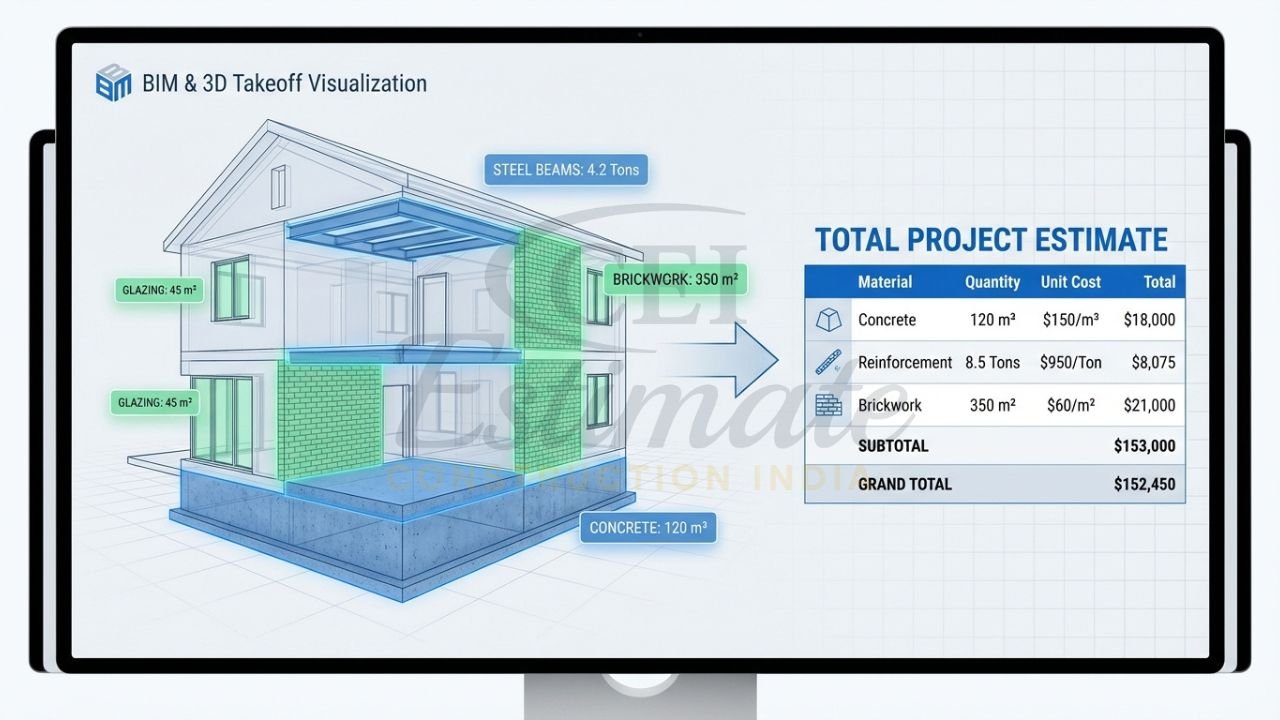
- Turn 2D PDFs, AutoCAD and BIM models into accurate digital takeoffs quickly.
- Maintain a current material and labor rate database (including India-specific schedules, vendors and GST-inclusive rates).
- Create professional BOQs, rate analyses and proposals in your format.
- Track change orders/variations and revised BOQs without losing the audit trail.
- Collaborate with your team, clients and subcontractors in the cloud.
- Integrate with accounting (Tally, QuickBooks, Xero) and project management so numbers stay consistent across your business.
For Indian contractors, GST compliance, RA bill formats, and local schedule-of-rates alignment are now standard expectations – not “good to have”. Good tools help you price smarter, submit faster, and protect your margin once the job is awarded.
Must-Have Features in Estimating Software for General Contractors
When you evaluate any estimating software in 2026, look for these essential features:
- Fast digital takeoff from PDF, scanned drawings, AutoCAD and BIM (2D + 3D).
- Central rate database with material and labor rates (India-specific pricing, supplier lists, multiple currencies).
- Assembly/recipe pricing (e.g., 1 m² brickwork = bricks + sand + cement + labor).
- BOQ and rate analysis outputs in your standard formats (Excel, PDF, GST-ready).
- Bid comparison tools for analyzing multiple supplier/subcontractor quotes.
- Version control for drawings and estimates (so you never price off old revisions).
- Variation/change order management with updated BOQ and cost impact tracking.
- Integration with accounting tools (Tally, QuickBooks, Xero) and ERP/Project Management platforms.
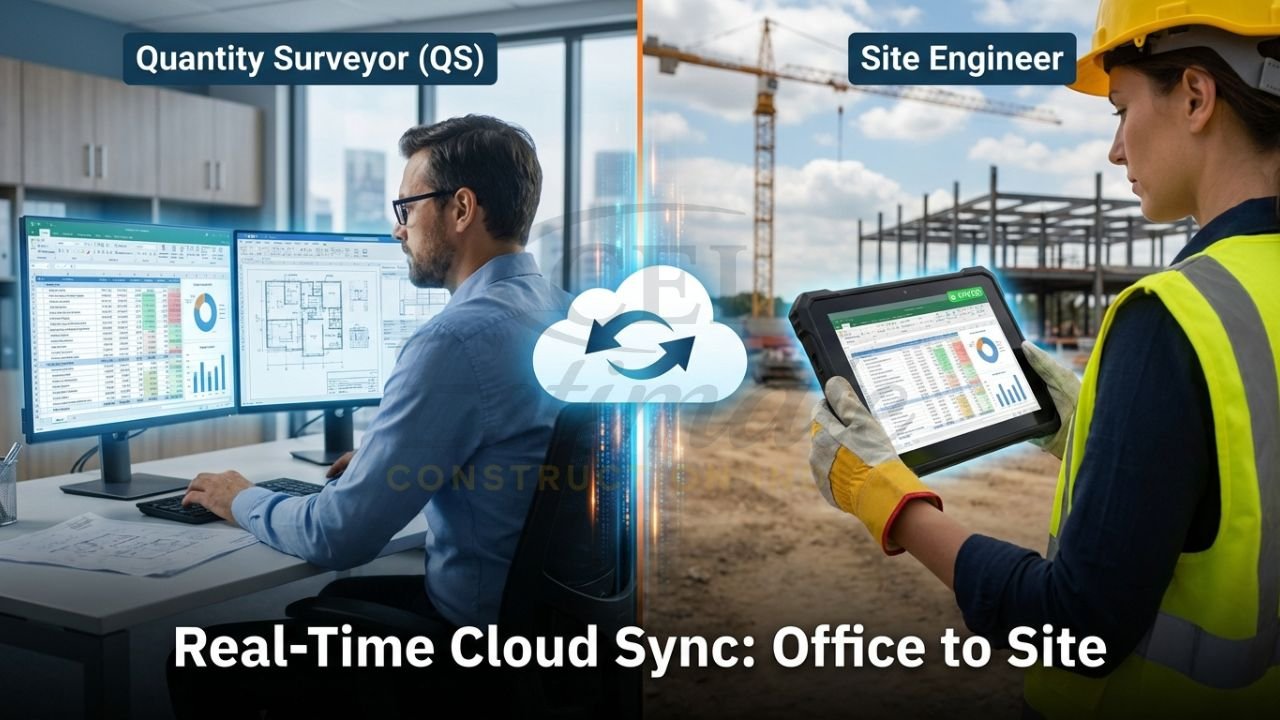
- Cloud and mobile access so your site team, QS and office can work off the same numbers.
- Multi-user collaboration, role permissions, and approval workflows.
- Reporting and dashboards: margin tracking, cost breakdown by trade, project-wise profitability.
- Local tax/GST support, including different tax slabs and location-based rates for India.
Top 10 Best Estimating Software for General Contractors in 2026
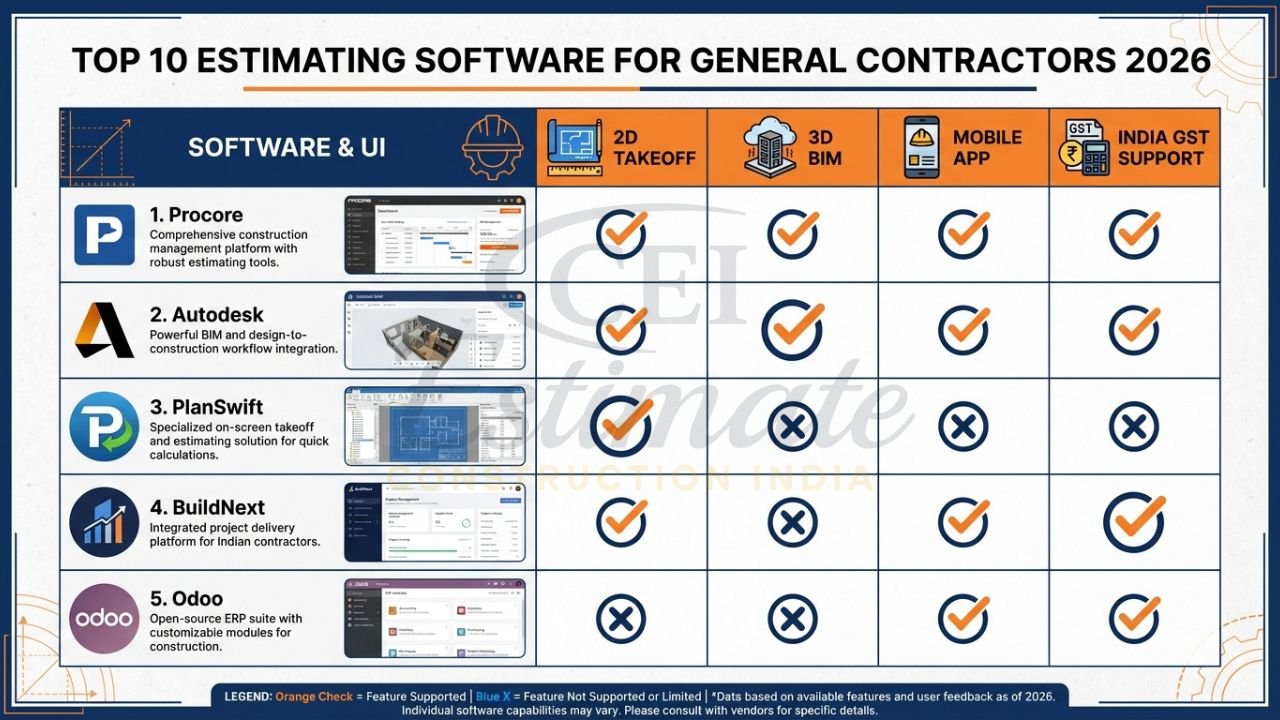
Below are the 10 most popular and highly-rated estimating tools used by general contractors globally and in India in 2026, with realistic “best for”, pricing and feedback based on current data.
1. Procore Estimating
Best for: Mid to large GCs doing multiple projects at once, especially those who want project management + estimating on one platform.
Key strengths
- Cloud-based takeoff and estimating integrated inside the broader Procore platform (drawings, RFIs, change orders, cost control).
- Strong for collaboration between office, site and subcontractors.
- Works well for firms already using Procore for project management or cost management.
Features
- 2D quantity takeoff from PDF plans; integrated with project documents.
- Central cost database and templates; configurable for trade packages and assemblies.
- Change-order and variation tracking tightly linked to budgets and contracts.
- Integrations and APIs for accounting and ERP workflows.
Pricing (2026 – typical)
- Procore uses a construction-volume-based model, often about 0.1–0.2% of annual construction volume.
- For smaller contractors (~20–30M USD/year), you commonly see 20,000–40,000 USD/year for project management + financials, with estimating as part of the bundle.
- Enterprise operations (~50M+ USD/year) can easily reach 50,000–150,000+ USD/year once you add implementation and training.
Learning curve
- Medium to high: you’ll need onboarding and process change, but once configured, it’s powerful for end-to-end control.
Pros
- All-in-one platform reduces data duplication and manual re-entry.
- Strong change-order management, great for protecting margin.
- Unlimited-user collaboration model is attractive for larger teams.
Cons
- Expensive for small firms; not ideal if you only want estimating.
- Implementation takes time and internal champions.
- Ongoing price escalations (2–5% typical, sometimes higher) at renewal.
Contractor feedback
Contractors like Procore Estimating because it keeps takeoff, budgets and live job cost in one place, improving visibility and helping prevent margin erosion from undocumented changes.
2. Autodesk Construction Cloud (Autodesk Takeoff + Estimate)
Best for: Design-build firms, BIM-heavy GCs, and contractors working with detailed 3D models as well as 2D PDFs.
Key strengths
- Integrated 2D and 3D takeoff (Autodesk Takeoff) with BIM workflows.
- Deep ecosystem: Docs, Build, BIM Collaborate, Estimate all on one cloud.
Features
- Automated quantity extraction from 3D models plus manual 2D takeoff.
- Cloud collaboration: estimators, designers and PMs can work together.
- Integrations with other Autodesk tools and external systems via APIs.
- Supports complex commercial and infrastructure jobs with multiple trades.
Pricing (2026 – typical)
- Autodesk Takeoff has published pricing around 1,250 USD/year per subscription in prior data.
- Autodesk Build and other modules are priced separately; full Autodesk Construction Cloud pricing is typically “contact sales” with bundled quotes.
Learning curve
- Medium: easier if your team already uses Autodesk tools; some training needed for estimators switching from 2D-only workflows.
Pros
- Best-in-class for BIM-based estimating and integrated 2D/3D quantities.
- Strong for collaboration with architects and consultants.
- Scales well for larger, complex projects.
Cons
- Not the cheapest option for small contractors.
- Full value comes when you commit to the Autodesk ecosystem.
- India-specific GST and local item rate libraries require configuration or partner add-ons.
Contractor feedback
Users appreciate the accuracy of connected 2D/3D quantities and the ability to standardize estimating templates across projects, improving bid speed and reducing scope gaps.
3. PlanSwift
Best for: Small to mid-size GCs who want a focused digital takeoff tool that works well with Excel-based estimating.
Key strengths
- Very popular 2D takeoff tool; easy to adopt for Excel-driven estimators.
- Good value compared to larger enterprise systems.
Features
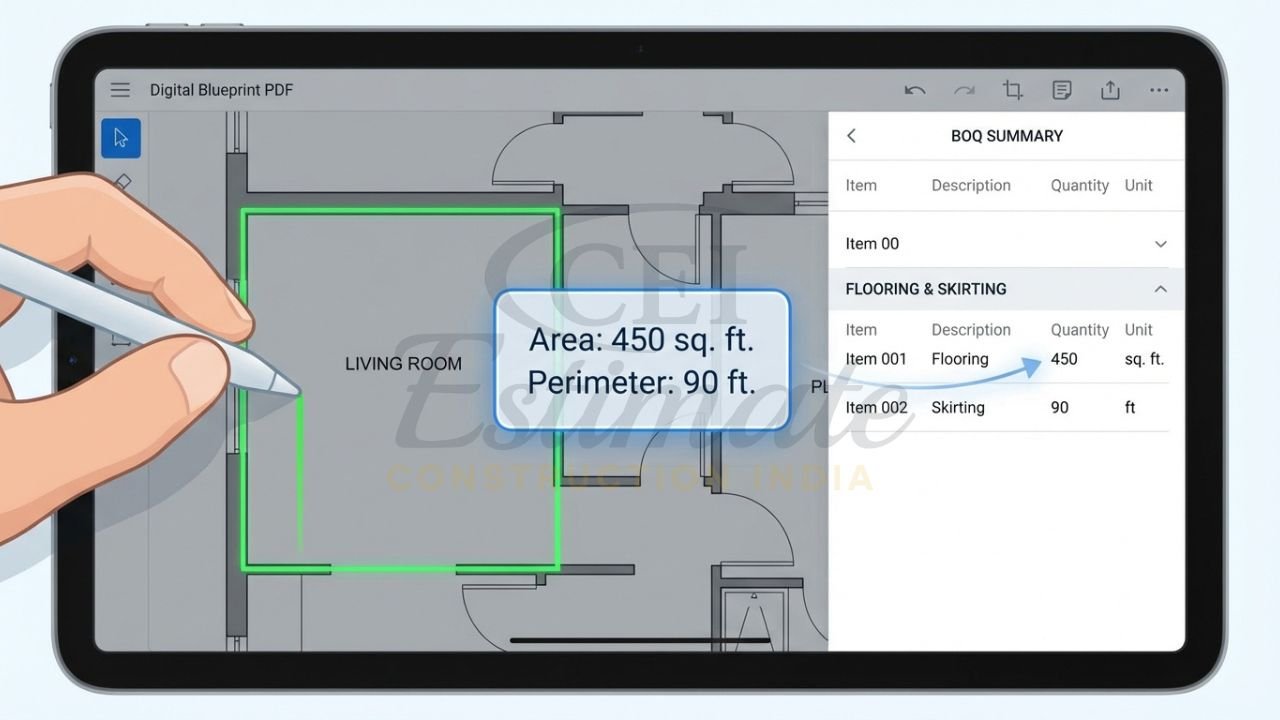
- Fast point-and-click takeoff: lengths, areas, counts directly on digital plans.
- Simple integration with Excel – send takeoff quantities to existing spreadsheets.
- Flexible templates for trades (civil, finishes, MEP).
Pricing (2026 – typical)
- PlanSwift Professional is around 2,000 USD per year, flat-rate, including updates and support for one user.
Learning curve
- Low to medium: most estimators get comfortable in a few days, especially if they already work with Excel.
Pros
- Affordable compared to big platforms.
- Perfect if you like your Excel estimating logic but want faster digital takeoff.
- Widely used, lots of tutorials and community help.
Cons
- Not a full project management or ERP system.
- Limited native India-specific GST/rate-book features – you’ll handle that in Excel.
- Less ideal for multi-office collaboration compared to fully cloud-native tools.
Contractor feedback
Contractors like the simplicity and speed: it cuts takeoff time significantly while letting them keep their own costing structure in Excel, which is useful for Indian firms with custom BOQ formats.
4. Bluebeam Revu (with Takeoff Tools)
Best for: Contractors who rely heavily on PDFs for drawings, RFIs and markups and want integrated measurement and communication.
Key strengths
- Industry-standard PDF markup tool for construction with strong measurement tools.
- Great for review workflows plus 2D takeoff.
Features
- Length, area, volume, count measurements, including Dynamic Fill for irregular shapes.
- Quantity Link to Excel for live updates between takeoff and spreadsheets.
- Markups, issues, stamps, and collaborative studio sessions for teams.
- Good for as-built documentation and drawing control in addition to estimating.
Pricing (2026 – typical)
- Cloud subscription tiers around 240–599 USD per user per year, depending on plan (Standard/CAD/eXtreme).
- In India, resellers often price around 14,900–25,000 INR/year per user for Revu subscriptions.
Learning curve
- Low to medium: basic PDFs/measurements are easy; advanced automation and scripts take longer.
Pros
- Excellent PDF handling and collaboration.
- Strong measurement tools; great for teams reviewing drawings and extracting quantities.
- Works well in combination with Excel, PlanSwift or other estimating systems.
Cons
- Not a complete estimating and costing platform by itself.
- Rate databases, GST and assemblies must be handled in external tools.
- 3D/BIM workflows are better handled using Autodesk or CostX.
Contractor feedback
Bluebeam is often described as “essential” by GCs for drawing review and quick measurements; they appreciate how it speeds up markups, RFIs and early-stage quantity checks.
5. Buildxact
Best for: Small to mid-size residential contractors and remodelers who want estimating plus light project management in one simple package.
Key strengths
- Built for builders, not accountants: quick learning curve and templates.
- Combining digital takeoff, estimating, quoting and basic job management.
Features
- Digital takeoffs on plans uploaded directly, with assemblies and templates.
- Simple BOQ/quote generation with your branding.
- Project scheduling, purchase orders, change orders, and basic job cost tracking.
- Integrations to accounting systems and dealer/supplier pricing.
Pricing (2026 – typical)
- Foundation: from about 199 USD/month (or ~2,030 USD/year on annual plan).
- Pro: from about 399 USD/month; Master: from 599 USD/month, with discounts on annual billing.
Learning curve
- Low to medium: designed for smaller builders; most can be productive within 1–2 weeks.
Pros
- Good all-rounder for small–mid residential builders.
- Reasonable monthly pricing vs. enterprise systems.
- Built-in material & labor pricing assistant (US focus), quote builder, and change-order tools.
Cons
- More tuned to US/AU markets; Indian GST and local SOR may require custom tweaks or external accounting integration.
- Less suited to huge multi-site infrastructure jobs.
Contractor feedback
Builders praise its simplicity and end-to-end workflow from enquiry to quote to job; it’s especially popular where they want to move away from Excel but are not ready for large ERP tools.
6. STACK (by ConstructConnect)
Best for: Small to mid-sized GCs who want a pure cloud-based takeoff and estimating platform with good preconstruction features.
Key strengths
- 100% cloud, accessible from anywhere, team collaboration built-in.
- Strong digital takeoff with estimating and proposal tools.
Features
- 2D digital takeoff with support for counts, areas, linear measurements.
- Bid-day analysis, proposal generation and trade-specific templates.
- Integrations with ConstructConnect project leads and data.
- Shared plans and documents in the cloud for estimating teams.
Pricing (2026 – typical)
- TRUSTed data shows tiers: Free, then Start around 2,999 USD/year, and higher Grow/Build tiers from 5,499 USD/year+.
- ConstructConnect project intelligence and takeoff bundles start around 129–199 USD/month for data plans in some packages.
Learning curve
- Medium: friendly UI, but more powerful features take time to master.
Pros
- Cloud-native; great if your estimators work remotely or across cities.
- Solid for commercial bid takeoffs, especially in North America.
- Good if you want a combined project-leads plus takeoff ecosystem.
Cons
- Pricing is on the higher side for small Indian contractors once converted to INR.
- India-specific rate databases and GST still need custom handling.
- Availability and local support may be limited compared to global giants.
Contractor feedback
Users highlight improved speed and collaboration in preconstruction, especially when multiple estimators work on the same set of drawings.
7. RIB CostX / RIB Candy
Best for: Medium to large contractors and QS firms, especially those dealing with BIM and complex costing.
Key strengths
- 2D and 3D/BIM takeoff with integrated cost planning.
- Widely used by quantity surveyors for detailed measurement and cost analysis.
Features
- BIM-based takeoff from models, plus traditional 2D PDF/CAD measurement.
- Multiple views, workbooks, and detailed rate analysis.
- Customizable cost libraries and codes; strong for standard method of measurement.
- Integration with other RIB tools and enterprise workflows.
Pricing (2026 – typical)
- RIB CostX/Candy uses quote-based pricing; packages (Complete, Core, Quantify) are priced by edition and license count.
- Typically mid-to-high price bracket vs. basic takeoff tools, targeting professional QS and larger firms.
Learning curve
- Medium to high: powerful but technical; best when you have dedicated QS/estimating staff.
Pros
- Very strong BIM and structured BOQ capabilities.
- Good fit for complex commercial/infrastructure projects and QS offices.
- Supports disciplined cost planning workflows and detailed reporting.
Cons
- Overkill for small residential contractors doing simple BOQs.
- Requires training and process setup.
- India-specific SOR and GST support may require local implementation partners.
Contractor feedback
Users value its BIM integration and detailed cost breakdown, especially for repeated project types where a strong cost library unlocks major time savings and consistency.
8. BuildNext Estimator (India-focused)
Best for: Indian residential builders and design–build firms who want BOQ-linked planning and local support.
Key strengths
- India-first product, tuned to local BOQ formats and GST requirements.
- Strong estimation and BOQ import/export features.
Features
- BOQ-linked planning and tracking, import/export from Excel.
- Estimation-heavy approach with support for VR planning and material tracking (inside the wider BuildNext ecosystem).
- Hindi support and WhatsApp alerts in some packages.
Pricing (2026 – typical)
- BuildNext “Starter” / estimation tools typically around 4,000 INR/month or about 50,000 INR/year for small–mid builders.
Learning curve
- Low to medium: made for Indian contractors, with familiar BOQ structures.
Pros
- India-specific GST and RA billing workflows.
- Good BOQ import/export and multi-project handling for small–mid contractors.
- Better value than many foreign tools when used only for estimation and planning.
Cons
- Less suitable if you mostly do international work.
- Advanced BIM/GIS-capable workflows are limited compared to global giants.
- Features are evolving; check latest version before major rollout.
Contractor feedback
Indian builders like the combination of local pricing, BOQ workflows and language support; the tool feels closer to their real day-to-day than generic USA-focused platforms.
9. EstiMate / CostGuru / Realx Estimation (Indian Tools)
(Representative category of India-focused estimating tools used by small–mid contractors; exact features vary by vendor.)
Best for: Small to mid-size Indian GCs who want low to mid-cost desktop/cloud estimating tools aligned to local formats and taxes.
Key strengths
- India-focused features such as GST, SOR mapping, and local cost codes.
- Often integrate with Tally or provide export formats compatible with Indian accounting workflows.
Common Features
- Item-wise quantity takeoff inputs and BOQ outputs.
- Rate analysis with material, labor, machinery and overhead percentages.
- GST and tax calculations, RA bill formats, and basic progress billing.
- Excel/PDF export for submission to clients and consultants.
Pricing (2026 – typical)
- Many of these tools price in the range of 500–8,000 INR/month, sometimes per company rather than per user.
Learning curve
- Low: they typically mimic Excel-type workflows with added structure.
Pros
- Very affordable vs. global platforms.
- India-specific forms and compliance; less customization needed.
- Good step up from pure Excel for small contractors.
Cons
- Limited BIM/3D capabilities.
- Cloud/mobile access and real-time collaboration can be weaker than global SaaS tools.
- Some products have less documentation or support than larger brands.
Contractor feedback
Contractors appreciate the value for money and local GST/BOQ support; these tools are often a first step from Excel to structured digital estimating.
10. Odoo + Estimating Apps (Open-Source / Low-Cost Favorite in India)
Best for: Contractors who want estimating integrated with a broader ERP (CRM, inventory, accounting, HR) and are comfortable with some customization.
Key strengths
- Open-source core with flexible modules – estimates, projects, inventory, accounting and more.
- Strong for Indian businesses because of local partners and GST-ready modules.
Features
- Quotation and estimate modules, including BOQ-style item lists.
- Integration with Odoo Accounting or Tally through connectors.
- GST-ready invoicing and RA-style billing with customization.
- Add-on estimating apps and construction modules tailored to BOQ and project costing.
Pricing (2026 – typical)
- Odoo SaaS user licenses often start around 9–10 USD/user/month in India for Standard plans.
- Implementation packages in India: small-business implementations from around 4–6 lakh INR, mid-sized 15–20 lakh INR, depending on modules and customization.
Learning curve
- Medium: base system is straightforward, but tailoring it to construction estimating needs partner support.
Pros
- End-to-end system (CRM, estimates, inventory, accounts) under one roof.
- Low license cost per user in India, with strong ROI when fully adopted.
- Excellent for contractors who want to standardize processes and data.
Cons
- Requires good implementation partner; DIY can go wrong.
- Estimating depth depends on how well the custom modules are configured.
- Upfront setup cost is higher than “plug-and-play” off-the-shelf tools.
Contractor feedback
Indian SMEs like the combination of ERP features and GST-ready accounting; once configured, Odoo becomes the central system for leads, estimates, PO, billing and cash flow.
Quick Comparison of the Top 10 Estimating Tools
2026 Estimating Software Snapshot for General Contractors
| Rank | Software | Best For | Starting Price (2026, approx) | Takeoff Strength | Rate Database / Libraries | Cloud / Mobile | India GST Support | Learning Curve |
| 1 | Procore Estimating | Mid–large GCs, multi-project | ~20,000–50,000 USD/year+ bundle | Strong 2D, integrated | Project-wide cost database | Yes | Via config/partners | Medium–High |
| 2 | Autodesk Construction Cloud | BIM-heavy, design–build, large jobs | ~1,250 USD/year (Takeoff) up, bundles vary | Very strong 2D+3D/BIM | Custom libraries per firm | Yes | Via setup/customization | Medium |
| 3 | PlanSwift | Small–mid GCs with Excel estimating | ~2,000 USD/year per user | Strong 2D PDF | Excel-based, user-defined | Limited cloud | External via Excel | Low–Medium |
| 4 | Bluebeam Revu | PDF-heavy teams, review + measurements | ~240–599 USD/user/year | Strong 2D PDF | Via Excel or other tools | Yes (web/mobile) | External via accounting | Low–Medium |
| 5 | Buildxact | Small–mid residential builders | ~199–599 USD/month | Good 2D on plans | Built-in assistant (US focused) | Yes | Via integration/custom | Low–Medium |
| 6 | STACK | Cloud-first estimators, commercial jobs | ~2,999 USD/year+ tiers | Strong 2D cloud | Templates & custom lists | Yes | Via external tools | Medium |
| 7 | RIB CostX / Candy | QS firms, mid–large contractors | Quote-based, mid–high range | Very strong 2D+3D/BIM | Advanced structured libraries | Yes | Via partner config | Medium–High |
| 8 | BuildNext Estimator | Indian residential builders | ~4,000 INR/month or 50,000 INR/year | Good 2D + BOQ import | India-focused BOQ/rates | Yes | Native GST-friendly | Low–Medium |
| 9 | EstiMate / CostGuru / Realx | Small–mid Indian GCs | ~500–8,000 INR/month range | Basic 2D/manual inputs | India-specific SOR-based | Varies | Native GST, RA bills | Low |
| 10 | Odoo + Estimating Apps | Process-driven SMEs, ERP-minded firms | ~9–10 USD/user/month + 4–6L+ setup | Basic–good 2D via add-ons | ERP-wide rate & item masters | Yes | Strong GST via modules | Medium |
How We Help General Contractors Choose & Use the Right Tool
Choosing the wrong estimating software can cost you more than subscription fees – it can cost you bids, time and margin. Instead of guessing, you can lean on our hands-on experience with these tools and with real BOQs and tenders in India and international markets.
Here’s how we help:
- We audit your current process (Excel sheets, drawings, project types, team size, budget).
- We shortlist 2–3 tools that fit your exact situation (local vs global, residential vs commercial, India vs export projects).
- We guide you on how to structure your item/rate database so future estimates become faster and more consistent.
- We help integrate your estimating system with accounting (Tally, QuickBooks, Xero) and project management tools where needed.
We also provide professional cost estimating and takeoff services. We deliver detailed cost estimates and takeoffs – our price starts from 10,000 INR only.
To get started, WhatsApp +91 8630676890 and tell us your project type (residential/commercial/infrastructure), location and approximate project value.
Get Your Free Software Recommendation + Professional Estimate
Follow these steps if you want a concrete result this week:
- Send a WhatsApp message to +91 8630676890 with a short intro: type of projects, city, and whether you mostly work in India or also internationally.
- Share sample drawings/BOQ (PDF, AutoCAD, Excel) for one live or recent project.
- Get a free shortlist of 2–3 estimating tools that fit your budget, project mix, and team capacity – including suggestions for India-specific rate databases and GST workflows.
- If you wish, order a professional detailed takeoff and cost estimate for your project – starting from 10,000 INR only.
- Use our estimate plus the recommended software to submit faster, more accurate, more profitable bids.
Prominent WhatsApp CTA Box
Need help picking the right estimating software or preparing a detailed BOQ?
WhatsApp +91 8630676890 now for:
- Free software shortlist for your business
- Professional quantity takeoff & cost estimate
- Full BOQ and budget (starting from 10,000 INR only)

Common Pain Points These Tools Solve
Modern estimating software directly addresses the problems most GCs complain about:
- Manual Excel errors: Hidden formula mistakes that quietly destroy margin.
- Outdated material/labor rates: Using last year’s prices in today’s volatile market.
- Slow takeoffs: Spending days on manual measurements instead of adding more bids.
- Lost bids due to speed: Competitors submit accurate proposals before you finish measuring.
- Profit erosion: Poor variation/change-order tracking means you absorb costs you should have claimed.
- Lack of visibility: Owners and PMs don’t see margin impact until it’s too late.
With the right tool + a structured rate database and BOQ template, you can:
- Cut takeoff time by 30–70% on repeated project types.
- Improve pricing accuracy and consistency across your estimators.
- Track variations and protect profit even when designs change mid-project.
FAQ – Estimating Software for General Contractors (2026)
- Which estimating software is best for a small general contractor in India?
If you’re doing mostly residential/commercial projects with 5–20 employees, BuildNext Estimator, Indian tools like EstiMate/CostGuru/Realx, or Odoo with construction modules usually give the best balance of cost, GST support and ease of use. - I already use Excel for estimating. Do I really need software?
If your tenders are simple and volume is low, Excel may be enough, but as soon as you handle multiple projects, variation orders and frequent rate changes, digital takeoff tools like PlanSwift or Bluebeam Revu plus a structured rate database save major time and reduce costly mistakes. - How much should a small contractor budget for estimating software in India?
Expect anywhere from 500–8,000 INR/month for Indian-focused tools or small Odoo setups, and around 4,000–5,000 INR/month if you choose BuildNext Starter-level tools. - Which tools are best if I work on large commercial or BIM-based projects?
For complex commercial or infrastructure work, Autodesk Construction Cloud (Takeoff/Estimate) or RIB CostX are usually the strongest choices, sometimes combined with Procore for project management. - Can these tools integrate with Tally, QuickBooks or Xero?
Yes – many global tools offer APIs or third-party connectors, while India-friendly platforms like Odoo and some local estimating tools can export/import directly into Tally or provide formats that accountants can easily use. - How long does it take to learn a new estimating tool?
Simple tools like PlanSwift, Bluebeam and most Indian estimating apps can be learned in 1–2 weeks, whereas larger systems like Procore, Autodesk and Odoo need a few weeks to a few months to fully adopt across your company. - Do these tools work on mobile for site engineers?
Cloud tools such as Procore, Autodesk Construction Cloud, STACK, Buildxact, BuildNext and Odoo offer mobile apps so engineers can view quantities, drawings and sometimes approve variations from site. - How do I keep material and labor rates up to date in the software?
You can either maintain your own rate library (updated from supplier quotes, SOR and past projects) or connect to price feeds where available; many contractors update rates monthly or at tender stage so estimates always use current numbers. - Is BIM-based estimating worth it for a mid-size GC?
If your projects come with decent-quality BIM models and you work on repeat building types, BIM-based tools like Autodesk Takeoff or RIB CostX can significantly improve accuracy and make change management much easier. - Can you help us set up the software and also prepare estimates?
Yes – we can help you choose the right tool, set up your item and rate database, design your BOQ templates, and deliver full professional takeoffs and cost estimates for live tenders (starting from 10,000 INR per project).
Conclusion
The right estimating software in 2026 is not just a “nice tool” – it is the engine that powers faster bids, sharper pricing, and better profit protection across all your projects. Whether you’re a small GC in a Tier-2 Indian city or a mid-size builder handling multiple projects across states or countries, there is a tool that fits your budget and workflow.
Instead of spending months testing everything yourself, let us analyse your requirements and suggest a focused shortlist – and, if you want, we’ll also prepare detailed takeoffs, BOQs and full cost estimates ready to submit.
WhatsApp us now at +91 8630676890 for your free software recommendation and professional detailed cost estimates & takeoffs, starting from 10,000 INR only.
What’s your approximate monthly software budget for estimating (in INR or USD)?